Hydration
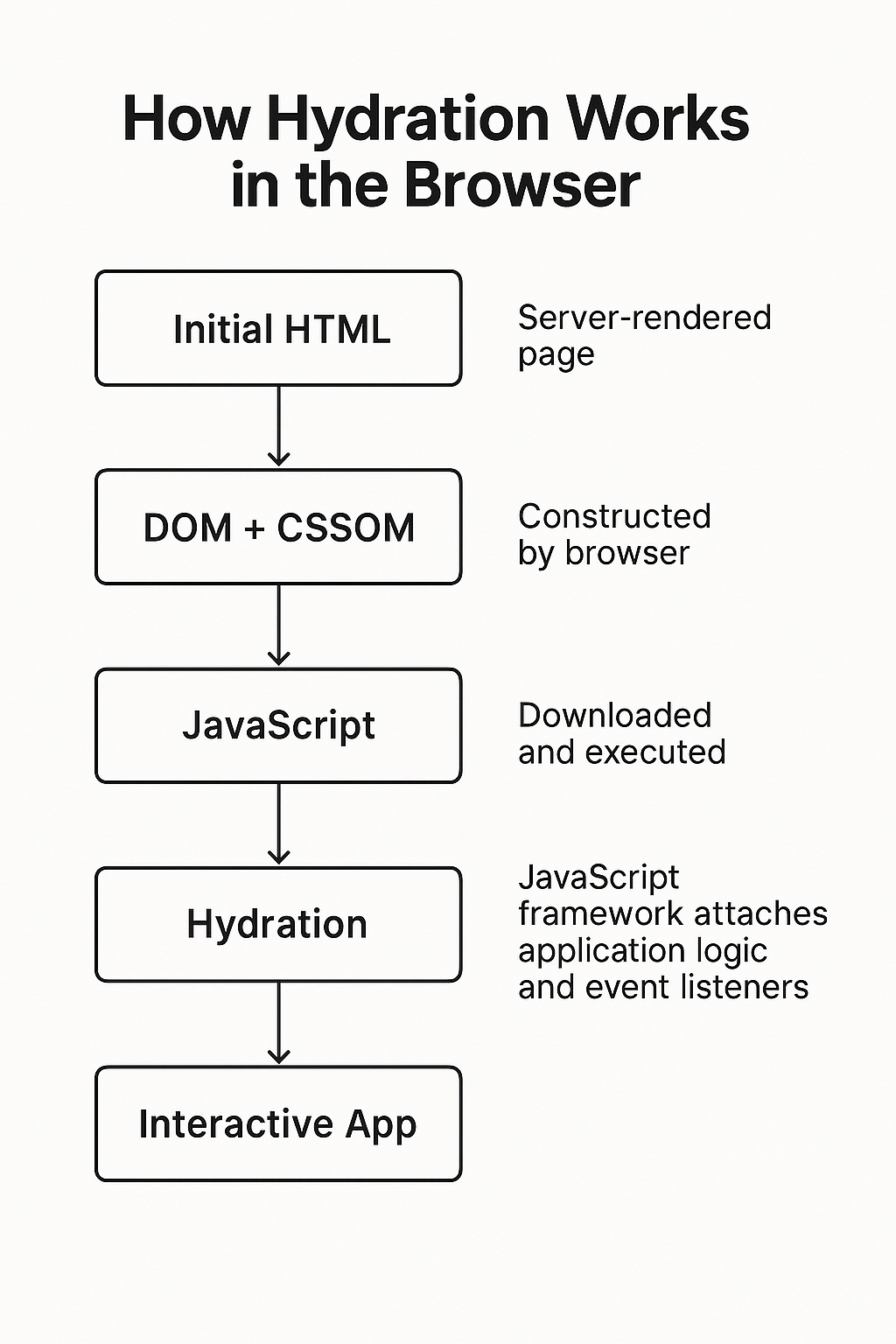
How Hydration Works in the Browser: Understanding the Web App Load Process
When building modern web applications—especially those using frameworks like React, Vue, or Svelte—you'll often encounter the term "hydration." This blog post dives deep into what hydration is, how the browser processes a web app from load to interactivity, and why it matters for performance and user experience.
🧠 What Is Hydration?
Hydration is the process where the browser takes a static HTML page (usually pre-rendered on the server) and attaches JavaScript event listeners to make it fully interactive. It's a critical concept in Server-Side Rendering (SSR) and Static Site Generation (SSG) workflows.
Why Hydration Exists
- Initial Performance: The server sends back HTML content quickly, making Time to First Paint (FCP) fast.
- SEO Benefits: Search engines see actual content instead of an empty
<div id="root"></div>. - Client Interactivity: The JavaScript bundle must "hydrate" the HTML to attach event listeners and component logic.
⚙️ Browser Loading Process for Web Apps
Let’s break down the typical lifecycle of a web app from the browser's perspective:
1. DNS Resolution & Connection Setup
The browser:
- Resolves the domain to an IP address.
- Opens a TCP connection and negotiates SSL (if HTTPS).
2. Request HTML Document
The browser sends a GET request for the initial HTML page:
GET / HTTP/1.1
Host: example.com
3. HTML Parsing Begins
As the HTML is streamed and parsed:
- The browser builds the DOM tree.
- Encounters
<link>,<script>, and<style>tags. - Blocks rendering on
render-blocking resources(e.g., non-deferred JS, CSS).
4. Loading Resources
While parsing:
-
CSS is downloaded and parsed to build the CSSOM.
-
JavaScript files are downloaded based on
<script>tag attributes:defer: runs after HTML parsingasync: runs as soon as it's downloaded
-
Fonts, images, and other assets are requested concurrently.
5. DOM + CSSOM = Render Tree
The render tree is built, and the page is painted.
6. JavaScript Execution & Hydration
If SSR/SSG was used:
- HTML already includes server-rendered content.
- JavaScript executes and calls
ReactDOM.hydrate()or framework equivalents. - The virtual DOM is reconstructed.
- Diffing ensures event listeners are bound without replacing the DOM.
This step transitions the app from "static content" to an interactive app.
ReactDOM.hydrate(<App />, document.getElementById('root'));
7. Interactivity Available
Once hydration completes:
- Event listeners work (clicks, inputs, etc.).
- State updates and client-side routing become functional.
💡 Hydration vs. Client-Side Rendering (CSR)
| Aspect | Hydration | CSR |
|---|---|---|
| Initial HTML | Pre-rendered | Minimal or empty |
| SEO Friendly | ✅ Yes | ❌ No (without pre-rendering) |
| Time to Interactivity | ⏳ Slightly delayed | ⚡ Faster after JS loads |
| Complexity | High (managing rehydration state) | Lower |
🧪 Debugging Hydration Issues
- Mismatches in server vs. client markup cause warnings.
- Use tools like React DevTools or Vue DevTools to inspect hydration status.
- Monitor network tab for JS bundle loading and hydration timing.
🚀 Optimizing Hydration
- Code Splitting: Load only what's needed.
- Lazy Hydration: Hydrate only visible parts of the page.
- Partial Hydration: Hydrate islands/components independently.
- Streaming SSR: Use
React 18orNext.js 13+withapp/directory.
🧵 Final Thoughts
Hydration bridges the gap between static HTML and a fully interactive SPA. Understanding how the browser loads and transitions your app helps diagnose performance issues and improve user experience. In the era of Edge Rendering, React Server Components, and framework meta-libraries like Next.js, hydration remains a foundational web concept that every frontend engineer should master.
🛠️ Built with curiosity. Debugged with frustration. Shared with love.